Vogn
0
Tilmeld dig og få 10% i rabat på din ordre
Forventet levering
1-3 dage
Du vil måske også kunne lide





Dansk Firma


Ergonomic chairs are adjustable seats engineered to support your spine’s natural S-curve, distribute pressure evenly across your body, and let you shift posture throughout the day — reducing strain and keeping you comfortable during long sitting sessions.
Here’s what they actually do for you:
The honest verdict: a well-fitted ergonomic chair genuinely helps with comfort and can reduce musculoskeletal strain, but only when it actually fits your body and is paired with good workstation habits. A chair that doesn’t fit you is just an expensive chair.
A well-fitted, properly adjusted ergonomic chair reliably improves comfort and can reduce musculoskeletal strain, but fit, adjustability, and workstation integration determine whether it actually delivers those benefits.
| Point | Details |
|---|---|
| Seat pan fit comes first | Leave a 0.5-inch gap behind your knees and support three-quarters of your thigh length to avoid contact stress. |
| Adjustability only works if you use it | Set all adjustments while seated in your normal work posture, then re-check after 20 minutes. |
| Comfort gains are consistent; pain relief varies | RCT evidence shows modest pain reductions in some groups; comfort improvement is the most reliable outcome. |
| Chair alone won’t fix a bad workstation | Pair your chair with correct monitor height, keyboard position, and regular movement breaks. |
| “Ergonomic” label is not a guarantee of fit | A chair must match your specific body dimensions and tasks — test or measure before buying. |
Every adjustment on an ergonomic chair exists for a specific biomechanical reason. Understanding the “why” behind each feature helps you cut through the marketing noise and actually test whether a chair will work for your body.
The seat pan is where most people go wrong. Seat depth and front-edge shape matter more than almost any other feature: you need at least a 0.5-inch gap between the seat’s front edge and the back of your knees, and the seat should support roughly three-quarters of your thigh length. Too deep, and the edge digs into the back of your knees, cutting off circulation and pulling you away from the lumbar support. Too shallow, and your thighs aren’t supported, which shifts load onto your lower back. A waterfall front edge (gently curved downward) reduces pressure behind the knees compared to a flat, squared-off edge.

The lumbar region of your spine naturally curves inward. When you sit without support, that curve tends to flatten or reverse, loading the discs and muscles of your lower back. A good backrest conforms to that natural curvature and gives you something to lean into, so your back muscles can relax rather than constantly brace. Adjustable lumbar height matters because the curve sits at different heights for different people — a fixed lumbar pad that hits your mid-back rather than your lumbar spine is basically decorative.
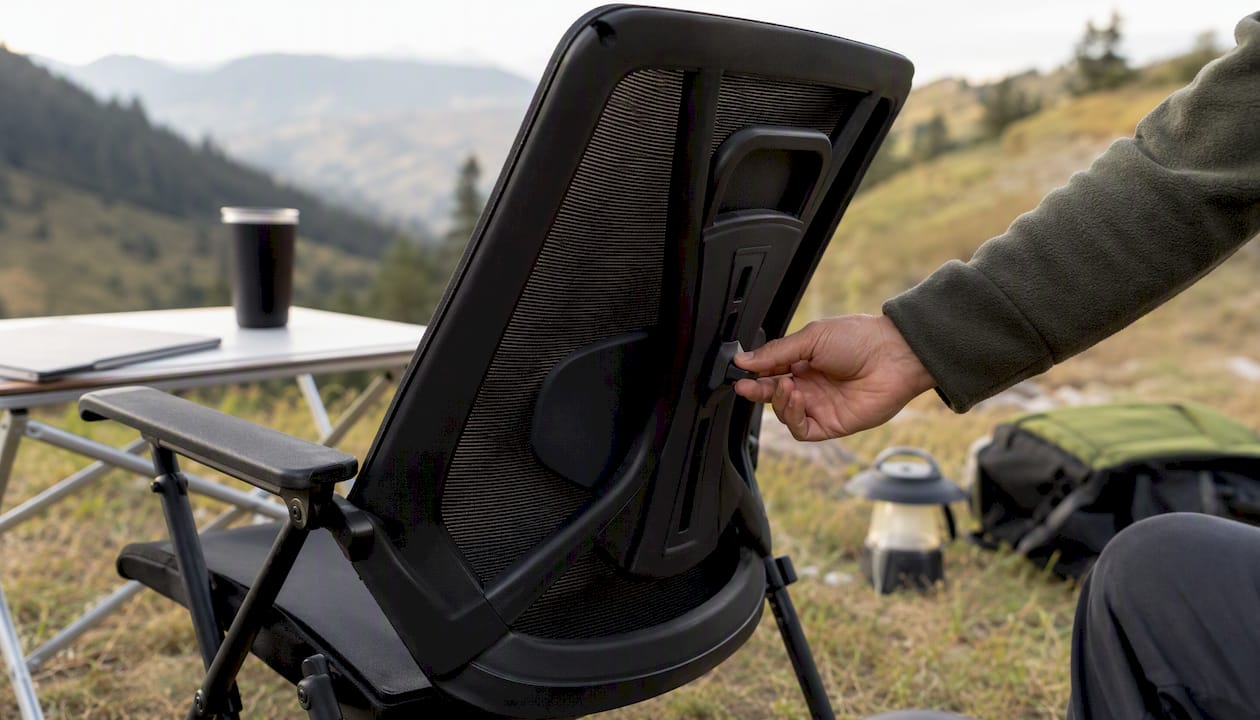
Get this wrong and everything else suffers. The right seat height lets your feet rest flat on the floor (or a footrest), keeps your knees at roughly a 90-degree angle, and prevents your thighs from pressing hard against the seat pan. Too high and your feet dangle, loading the backs of your thighs. Too low and your knees rise above your hips, tilting your pelvis backward and flattening your lumbar curve. Pneumatic (gas-lift) height adjustment is the standard to look for — it lets you dial in the height while seated.
Properly adjusted armrests take load off your shoulders and neck by supporting the weight of your arms. The catch is “properly adjusted” — armrests set too high hike your shoulders up toward your ears, and armrests that are too wide force your arms outward, creating lateral shoulder strain. Width-adjustable, height-adjustable armrests that can pivot inward are worth the extra cost if you type for hours. If armrests prevent you from pulling close to your desk, flip them down or remove them entirely.
Sitting perfectly upright all day is actually harder on your spine than a slight recline. Research supports dynamic sitting — small posture shifts and periodic recline — as preferable to a locked, rigid position. A good tilt mechanism lets you rock slightly and lean back while working, which varies the load on your spinal discs and keeps muscles from fatiguing in one fixed pattern. Look for tilt tension adjustment so the recline feels natural for your body weight, not like you’re fighting a spring.
A five-leg base is the stability standard — four-leg bases tip. Casters should match your flooring: hard casters on carpet, soft rubber casters on hard floors. The right casters let you roll to reach items without twisting your torso, which reduces the repetitive reaching and rotating that strains your lower back over time.
Pro Tip: When testing a chair in a store, don’t just sit still — bring your laptop or mime your actual work posture. Lean forward as if reading a screen, recline slightly as if thinking, and check whether the lumbar support stays in contact with your back through those movements. A chair that only feels good when you’re sitting perfectly upright will fail you within an hour of real work.
Comfort is the most consistent and reliable outcome. Across trials and reviews, people who switch to a well-adjusted ergonomic chair report less fatigue, less pressure behind the knees, and a more sustainable seated posture. That’s not a small thing — comfort directly affects how long you can focus and how much you fidget and compensate with awkward positions.
Pain reduction is real but more variable. A 4-month randomized controlled trial of 293 sewing machine operators found that a height-adjustable task chair with swivel reduced back and hip pain compared to a control group, with modest but measurable monthly improvements. Importantly, the effect varied depending on seat-pan shape — flat versus curved — which underlines that design details matter, not just the “ergonomic” label.
Study snapshot: The Los Angeles Garment Study (RCT, n=293) found modest monthly reductions in back and hip pain from an adjustable task chair versus control over 4 months. Effect sizes were modest and design-dependent — a useful signal, not a guarantee.
Most people notice comfort improvements within the first week or two. Pain-related changes, when they occur, tend to emerge over weeks to months rather than days. If you’re still uncomfortable after a month with a properly adjusted chair, the problem is likely elsewhere in your workstation or work habits, not the chair itself.
A systematic review of ergonomic chair interventions found consistent comfort gains across studies, while evidence on long-term pain and disability outcomes remained mixed and dependent on chair design, training, and study population. Comfort is a near-certain win; pain relief is a probable but not guaranteed one.
The word “ergonomic” on a product page is a marketing claim, not a certification. A chair labeled ergonomic isn’t automatically ergonomic for you. As the Canadian Centre for Occupational Health and Safety (CCOHS) points out, marketed ergonomic chairs are designed for a range of body sizes — and may not suit specific proportions or tasks at all.
Here are the red flags that tell you a chair won’t deliver on its promises:
Beyond poor chair design, there’s a bigger trap: assuming the chair alone will fix your pain. Static sitting in even the best chair still loads your spine continuously. NIOSH and CDC guidance is explicit that chairs are one component of a broader workstation approach — not a standalone solution. If your monitor is too low, your keyboard forces your wrists into extension, or you never take breaks, the chair can only do so much.
Very tall users (over 6’3") and very short users (under 5’2") often find that standard ergonomic chairs don’t fit well even at their adjustment extremes. If you fall outside the typical range, look specifically for chairs with extended height ranges or consider a footrest to compensate for seat height limitations.
Before you buy, confirm the chair offers:
For home office buyers who can’t test in person, measure your thigh length (back of knee to back of hip while seated) and compare it to the chair’s seat depth range. Hip width matters too — you want a seat that’s wider than your hips by a couple of inches, not so wide that the armrests are out of reach.
On cost: entry-level chairs often have basic height adjustment and limited lumbar options. Mid-range chairs typically add seat depth adjustment, better tilt mechanisms, and more durable materials. Higher-end chairs generally offer broader adjustability ranges, higher-quality foam and mesh, and longer warranties. You don’t need to spend $1,500 to get a genuinely ergonomic chair, but you do need to spend enough to obtain real adjustability. Check out Sitpack’s guide to ergonomic seating for a deeper look at what features to prioritize.
Pro Tip: Make all your adjustments while you’re actually sitting in your normal work posture, not while perched on the edge. Then work for 20 minutes and re-check. Your body settles into the chair differently once you’ve been sitting for a bit, and the lumbar and armrest positions often need a small tweak after that first real session.
A great chair in a badly set-up workstation is like good hiking boots on a trail with no map. The OSHA computer workstation guidelines are clear that a well-designed, appropriately adjusted chair is an essential element of a safe, productive workstation — but “workstation” is the operative word. The chair is one component.
A few quick wins that multiply what your chair does for you:
Accessories worth considering: a footrest if your feet don’t reach the floor at the correct seat height, a document holder at monitor height if you reference printed materials, and a monitor arm if your screen can’t be raised high enough on its own.
Pro Tip: Set a phone timer for 45 minutes when you start working. When it goes off, stand up, walk to refill your water, and do a quick posture reset before sitting back down. It sounds almost too simple, but breaking the static-sitting pattern is more protective than any single piece of equipment.
For employers: NIOSH/CDC guidance recommends pairing ergonomic equipment with training and organizational policies that actively support movement and posture variability. Handing someone an adjustable chair without showing them how to use it captures only a fraction of the potential benefit.
The evidence base is solid on comfort, more nuanced on pain, and honest about its own limits.
OSHA classifies an appropriately adjusted chair as an essential workstation element, emphasizing that adjustability helps users achieve better fit across different postures and body types. Their guidance specifically calls out lumbar support, foot support, and seat pan geometry as the core features that reduce awkward postures and contact stress.
NIOSH/CDC frames chairs as one part of a broader ergonomic program — not a standalone fix. Their ergonomic programs primer emphasizes mobility, posture change, and organizational practices like scheduled breaks alongside equipment choices.
RCT evidence is best illustrated by the Los Angeles Garment Study, which found modest but real pain reductions in a controlled, 4-month trial. The effect varied by seat-pan design, which tells us that not all ergonomic chairs perform equally even within a single study population.
Research summary: A systematic review published in PMC found that ergonomic chair interventions consistently improved comfort across studies, while outcomes on pain and disability were mixed and depended heavily on chair design, whether training was provided, and the study population. Trials that combined adjustable chairs with workstation training showed better outcomes than chair-only interventions.
The bottom line from the evidence: comfort improvement is a near-certain outcome from a well-fitted ergonomic chair. Pain reduction is likely in many cases but not guaranteed, and the magnitude depends on fit, design quality, and whether the chair is part of a broader workstation approach. Long-term disability outcomes need more research.
There’s a tendency in ergonomics writing to treat chair selection as a checklist exercise — get the right features, tick the boxes, done. That framing misses something.
The research is pretty consistent that adjustability only helps if you actually use it. A chair with twelve adjustment points that you set once and never touch again is functionally equivalent to a fixed chair. The OSHA guidance makes this point directly: adjustability should be easy to operate from a seated position so you can tweak fit throughout the day, not just during setup.
My honest take is that seat pan fit deserves far more attention than it gets. Most people shopping for ergonomic chairs fixate on lumbar support, mesh backs, or headrests — features that photograph well and appear prominently in marketing. But a misfitting seat pan creates pressure behind the knees, pulls you away from lumbar contact, and causes compensatory postures that negate everything else the chair does. Get the seat pan right first. Everything else is secondary.
If you’re still experiencing pain after upgrading your chair and adjusting your setup, the chair probably isn’t the problem anymore. Re-evaluate your desk height, monitor position, and whether you’re actually taking movement breaks. Chair-only fixes commonly fail when other workstation elements are forcing a sustained awkward posture. For a broader look at seating ergonomics, Sitpack’s complete guide to seating ergonomics covers the full picture.
This article is general information, not a substitute for advice from a qualified doctor. Consult a qualified healthcare professional about your own circumstances before acting on anything here.